
Building With AI · 13 July 2026 · 10 min read
50km Trail Run! Are you nuts?
OK I might be a bit nuts, although the race isn't until November so at the moment it's a future me problem. The current challenge is training for the run, and this is where I turned to AI to help.
The Challenge
I've been running for years now, mostly road running with a few half marathons and the full Melbourne Marathon a year or two back. The challenge I set for myself this year was to run a 50km trail run which is part of the GPT Grampians Ultra in November. It will also be the farthest distance I've run to date with around 2000m of elevation gain to boot. Yay!
When I initially signed up I went hunting for a training plan. I'm sure I could have found one online or used one of the countless apps out there, but where's the fun in that? Instead I decided this was a perfect chance to use some AI tools to help me out.
Phase 1: My boring first try
I started off in Claude Cowork with a new project and a monster prompt:
- First up I downloaded my Strava activity data and uploaded that to the project. There's a nice new MCP server from Strava that makes this way easier, but I didn't have access to it at the time. You find your data in the Dashboard under My Account then look for Download your account.
- I gave it links to the course route page on Strava and the race details on the GPT Grampians website.
- I also found my old marathon training plan and uploaded that to the project.
- Finally I asked it to create the training plan for me, including some personal health and fitness information because why not give a model my private information... Yes I understand the privacy implications of this. The resulting training plan was pretty good. I queried a few parts and included some additional information about my time commitments during a week. Out popped my detailed training plan as a spreadsheet and word doc with lots of lovely detail.
Phase 2: Let's create an ugly app together!
Funnily enough spreadsheets are not really my jam. Sure it was packed with detail, but at 5:30am in the morning when I'm getting up to head out for a run I'm not keen on cracking open my laptop to check my plan. It's then that I remembered I was a web developer and that I really liked mobile web apps. Even better I could vibe code the whole thing in no time at all and nerd out with AI.
First up I tried prompting Claude to build me a first draft of the app based on the training plan it had already created. What it came back with was sort of ugly to say the least, but it had the bones of a functional little app. It's then I remembered way back in the mists of time I used to be a graphic designer. To say my skills are rusty would be an understatement, but I knew a turd rolled in glitter when I saw one.
Phase 3: Let's smash out something more polished
OK this was getting serious. It was time to 'almost' use my two highly developed skill sets to create something a bit more polished.
Make it beautiful first
Thanks to my early years as a graphic designer I am plagued by a constant need to judge a book by its cover. Yes it can be superficial, but I'm also convinced that a good design can make a difference to the user experience.
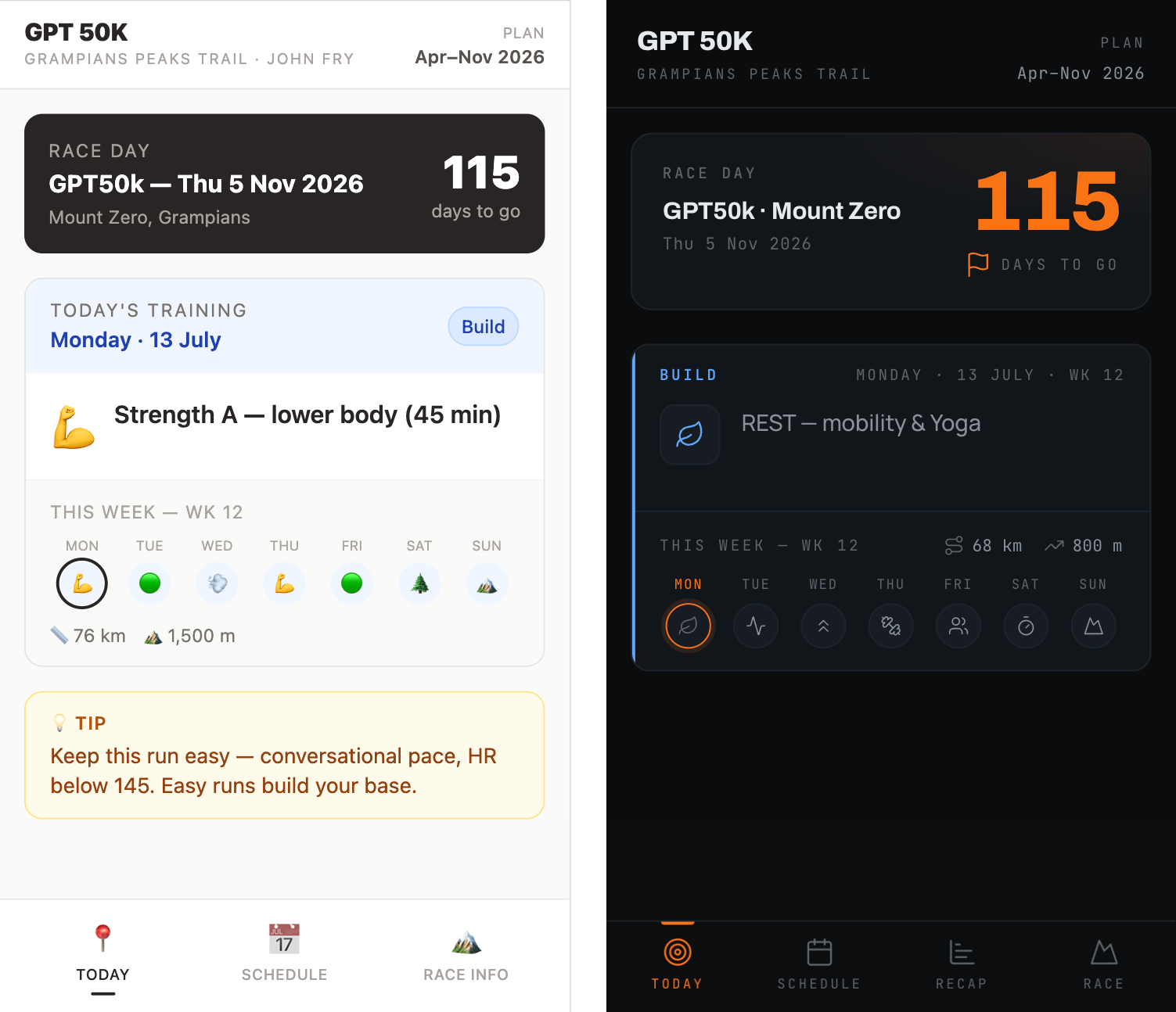
Before and after the design changes.
As this app is really just for my use I didn't want to get too bogged down in design details. So I took the route of finding a DESIGN.md file (I think Google may have developed this as a standard) based on a design system I liked. Dark mode, clean crisp icons and a simple colour palette.
If I wanted something more specific then I'd likely gather some inspiration on Pinterest, then jump into Claude Design and prompt my way to a design I was happy with.
Next make it functional with a stack I'm familiar with
I love building things with AI. I find it so empowering (I also swear at the screen way less than I used to when writing all the code myself). When 'vibe coding' projects I've found I get the best results when using a stack (a fancy term for a collection of tools and services you use to build something) that I'm familiar with, as it means I can be way more direct with my requests. It also means I can point it at the right documentation from the start so the agent has the latest and greatest information to work with. This is where my frontend dev background comes in handy, but if you're new to this then I'd highly recommend starting to develop a list of tools you like, or that come up regularly in your research.
- I chose NextJS as the frontend framework as I've used it before, I like the way it works, and I know how to get in there and tweak it if needed.
- NextJS goes hand in hand with Vercel for hosting and deployment. Vercel is a great choice for hosting as it's fast, reliable, and easy to use.
- I didn't really need a database for the project (just a local JSON file with the plan data) but I really like using Supabase or Neon for other projects.
- Tailwind CSS is a common choice for styling an app that you'll probably see out in the wild, and often a choice made by AI agents.
- I opted for a web app rather than a mobile app as I wanted to keep it simple, and as I mentioned before, I've been building websites for years now.
Build it with AI
I bounce around a bit when it comes to building things with AI. Tools come and go, how I like to work changes, and I've always found trying out new tools is not only fun, but keeps things fresh and interesting.
I've been using Claude Code as my daily driver for most workflows lately, or switching between Claude Cowork and Chat as well. I like how it works, Claude itself feels like the model I align with the most. I'm also comfortable in the terminal and I like how it integrates with existing tools like VSCode.
I've also built a few things with Codex from OpenAI as part of my exploration of new tools. I don't think it's quite captured my attention like Claude Code has.
But for this project I decided to use Cursor which has been my go-to for client work for the last year or so. Cursor is an AI first code editor or IDE. Maybe I need to move on, but I still like being able to see the code in front of me when I'm working.
So I created a new project inside of Cursor and spun up a new NextJS site to start with (no point wasting tokens on something that took a moment for me to do). From there I dropped in the raw HTML file that Claude Cowork had created, saved as concept.html, and prompted Cursor to take this concept as the guide and build it out as a NextJS app. Breaking the design down into smaller components and building out the different routes required for the different pages.
With a few rounds of changes and refinements I had a working app that was pretty close. Next up I gave Cursor the DESIGN.md file I'd found and prompted it to style the app to match the design system. Now we were cooking!
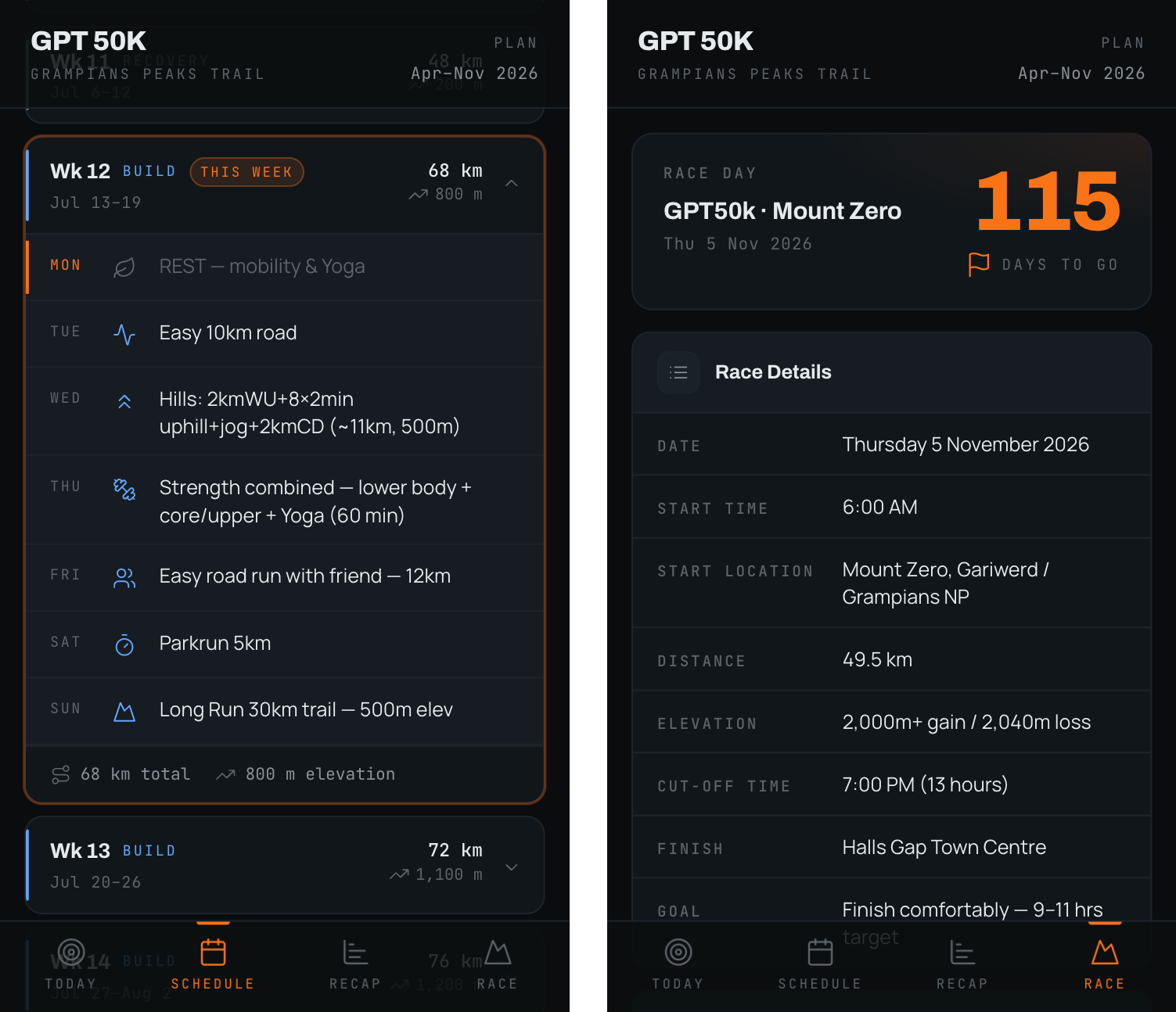
The Schedule and Race Day pages.
Phase 4: Release it to the interwebs!
Throughout the build process I made lots of small tweaks and fixes, but I also made sure I had versions as I went along. Just in case the AI went rogue at some point and I needed to revert back to an earlier version.
In my graphic design days I might have used a clever file naming convention like:
annual-report-v6-after-client-review--FINAL_v2_FINAL_v3_FINAL_USE-THIS_ONE.indd.
Luckily with code we can use a simple version control system like Git (Github is a popular choice for hosting your code) and have a history of changes and an easy way to revert to an earlier version.
What's also great about this system is it integrates directly with Vercel's hosting, allowing you to connect a Github repository directly to Vercel and have it update your live site whenever you commit changes to your code.
Getting the site live isn't always smooth sailing. Often you'll run into issues along the way. If that happens grab the error message from Vercel or your browser and paste it back into your agent and ask it to help you fix it.
Phase 5: Let's 'run' a few tests...
Sorry, I couldn't resist the dad joke there.
I've been using the app for the last 12 weeks now, some weeks better than others. I love that it counts down the days until the event (115 days to go!) and the weekly schedule is a great way to stay on track. I've made a few small tweaks as I've gone along, either tweaking the plan or making small adjustments to the app itself.
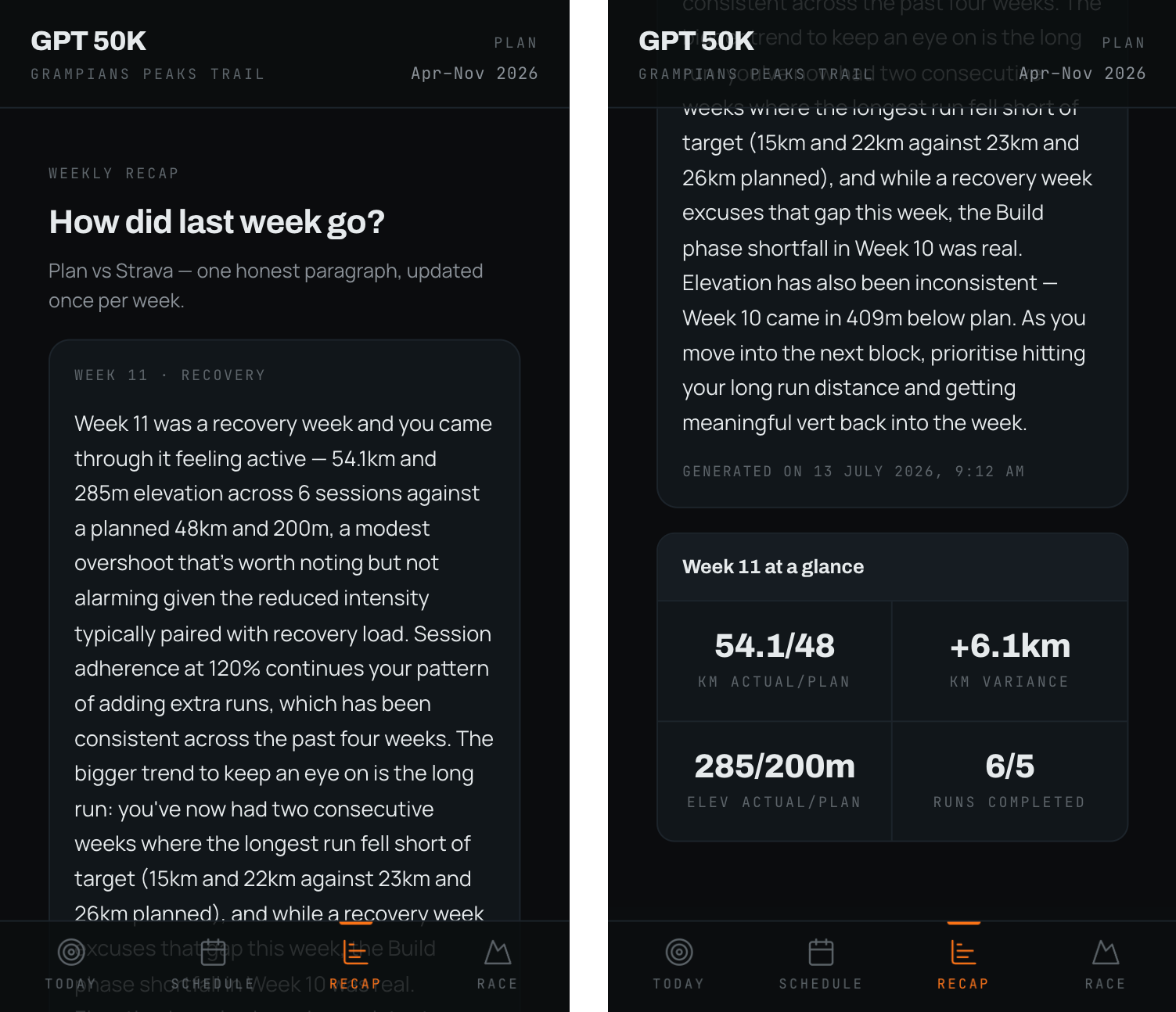
The Strava recap integration.
Last week I hooked it up directly to Strava via their OAuth setup, then added a call to Claude Sonnet using Vercel's AI SDK to keep things pretty simple. Now it gives me a weekly recap of my progress comparing the training plan with my actual Strava activity. So far it's been a bit of a jerk in how it interprets the runs, but I'm sure with a bit of tweaking to the system prompt it will get better.
So what was the point of my rambling post?
What can you take away from this if you've managed to read this far?
- Building things with AI can actually be fun and empowering.
- Pick a hobby you enjoy, then think about what you could build to make it either easier, more fun, or solve a real friction point. It doesn't have to be work related, in fact the more personal the better.
- Who cares if someone has built something similar before, there's always a way to make it your own.
- Start small and begin to build familiarity with the tools you're using.
- Ask your favourite AI tool to help you plan out your project.
- You will hit obstacles along the way. Don't worry, everyone does. Just take a breath (or swear your head off for a few minutes) then ask your trusty agent for help.
It's week 12 of my training plan and so far I'm feeling good. Every morning when I check the app I still get a bit of a buzz that I created this myself. The race itself is a ways off yet, November 5th to be exact. I'll let you know how it goes!